E444 APK Not Installing? How to Fix It Fast
Trying to install E444 and getting stuck partway through, or watching the installation fail without any clear explanation, is more common than you’d think and in almost every case, it comes down to a small, fixable issue rather than anything seriously wrong with your phone. This walks through the most common reasons installation fails and exactly how to resolve each one, starting with the quickest fixes first.
Why This Happens More With APKs Than App Store Apps
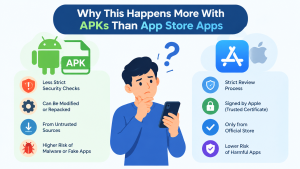
If you’re used to installing apps through the Google Play Store, the process usually just works without you thinking about it. APK installation is a bit different, since you’re installing a file directly rather than going through a store that’s already verified compatibility and handled permissions for you. That’s not a problem in itself — it’s just why a few extra checks matter here that you’d never normally think about.
E444, like most real-money gaming apps in this category, distributes through a direct APK download rather than the Play Store, so getting comfortable with this process is worth doing once properly.
The Most Common Reasons Installation Fails
1. Unknown Sources Isn’t Enabled
This is by far the most frequent cause. Android blocks installation from outside the Play Store by default as a security measure, so if you haven’t specifically allowed it, the installation will either fail silently or show a blocking warning.
How to fix it:
- Go to your phone’s Settings
- Look for Security or Apps (the exact wording varies by phone brand)
- Find Install unknown apps or Unknown sources
- If you’re installing directly from your browser, select your browser app in this list and enable the toggle
On newer Android versions, this permission is often requested per-app rather than as a single global switch, so you may need to grant it specifically to whichever app you used to download the file (usually Chrome or your file manager).
2. Not Enough Storage Space
E444’s APK file is a reasonably large download, and installation temporarily needs additional free space beyond the file size itself to extract and set up the app. If your phone is close to full, installation can fail without a clear error message explaining why.
How to fix it:
- Check your available storage under Settings > Storage
- Clear out unused apps, old downloads, or media you don’t need
- Aim for at least double the APK’s file size in free space before trying again
3. An Incomplete or Corrupted Download
If your internet connection dropped mid-download, or the download was interrupted for any reason, the resulting file can be incomplete — and Android will usually refuse to install a file that doesn’t match what it expects. This is especially common on mobile data connections that fluctuate, or when a phone goes to sleep mid-download and pauses the process without clearly showing that it happened.
How to fix it:
- Delete the partially downloaded file from your Downloads folder — a half-downloaded file sitting there can sometimes confuse the installer even after you download a fresh copy
- Re-download the APK from scratch, ideally on a stable Wi-Fi connection rather than mobile data
- Keep your phone active and unlocked while the download completes rather than letting the screen turn off partway through
- Always download directly from the official E444 website rather than a link shared through social media or a forum, since files from unofficial sources are more likely to be incomplete, outdated, or modified in ways that prevent proper installation
4. An Outdated Android Version
Every app version is built with a minimum supported Android version in mind. If your phone is running an older Android release than what the current E444 APK requires, installation may fail or the app may not open properly even if installation appears to succeed.
How to fix it:
- Check your Android version under Settings > About Phone
- Check for a system update under Settings > System > System Update
- If your device can’t be updated further and is on a very old Android version, this may be a genuine compatibility limitation rather than something you can fix on your end
5. A Conflicting Older Version Already Installed
If you have an older version of E444 already on your phone and you’re trying to install a newer version with different security signing, Android can sometimes block the installation rather than overwrite it cleanly.
How to fix it:
- Uninstall the existing E444 app first
- Restart your phone (this clears out any lingering installation cache)
- Try installing the new APK again
This is also a good moment to make sure you’re installing the latest official version, since older APK files floating around from unofficial sources can sometimes conflict with what’s currently being distributed.
6. Your Phone’s Security Software Is Blocking It
Some phones, especially certain Samsung and Xiaomi models, ship with additional security layers beyond standard Android permissions — things like Play Protect scans or manufacturer-specific app scanners that can flag any APK installed outside the Play Store, even a completely legitimate one.
How to fix it:
- If Google Play Protect shows a warning, look for an option to proceed anyway or temporarily disable scanning for this one install
- Check your phone brand’s specific security app (Samsung Knox, Xiaomi Security, etc.) for a similar override option
- Re-enable any security features you temporarily turned off once installation is complete
A Quick Pre-Installation Checklist
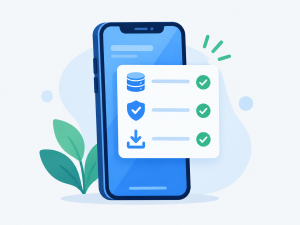
Before you try installing again, running through this list takes less than a minute and resolves the vast majority of installation issues:
- Unknown sources / install permission enabled for your browser or file manager
- At least a few hundred MB of free storage available
- A complete, non-corrupted download from the official source
- Android version reasonably current
- No conflicting older version still installed
- Security software not silently blocking the install
If Nothing Above Works
If you’ve worked through every step here and installation is still failing, it’s worth considering that the issue might be specific to your device model rather than something universal. In that case, reaching out directly is faster than continuing to troubleshoot blindly. You can get in touch through E444’s Contact Us page with details about your phone model and exactly what happens when installation fails — that specific information makes it much easier for support to pinpoint what’s going on.
A Note on Where You Download From
It’s worth repeating, since it matters more than most people realize: always download E444 from e444.com.pk directly. A growing number of similarly named sites have appeared that either host outdated files or aren’t affiliated with the official platform at all. If you’re ever unsure whether a site claiming to offer E444 is legitimate, our guide on how to tell the real E444 apart from copycat sites walks through exactly what to check.
Frequently Asked Questions
1. Why does my phone say app not installed with no other explanation?
This generic message usually points to one of a few causes: a corrupted download, a conflicting older version already installed, or insufficient storage. Working through the checklist above resolves most cases.
2. Is it normal for Android to show a warning before installing E444?
Yes. Since E444 isn’t distributed through the Play Store, Android shows a standard warning about installing from outside the store. This is expected behavior for any APK, not specific to E444, and isn’t a sign that something is wrong.
3. Can installing an APK harm my phone?
Installing files from an untrustworthy source can carry real risk, which is why sticking to the official E444 website for downloads matters. A legitimate APK installed correctly behaves like any other app.
4. Do I need to uninstall my old version before updating?
Not always, but if a direct update fails, uninstalling the old version first and then installing the new one is a reliable fallback that resolves most version-conflict issues.
5. What information should I include if I contact support about this?
Your phone brand and model, your Android version, and the exact point where installation fails (a warning message, a silent failure, or something else) all help support diagnose the issue faster.
Final Thoughts
Installation problems look alarming in the moment, but they’re almost always caused by one of a handful of well-understood issues — a permission that needs enabling, a storage shortage, or a download that didn’t complete properly. Working through the checklist above in order resolves the overwhelming majority of cases without needing to contact support at all.
Ready to try again? Download the latest official E444 APK here and work through the steps above if you run into any issues along the way.